
 Play now
DOVAKELI · FREE BROWSER GAMESA short break.
A short break.
Three games to play.
Catch fish in Tidebend, collect coins in Glimmer Run or line up a bowling shot in Lane & Roll. All three games run here in your browser, with no account, installation or purchase.
Touch and keyboard controls · No sound needed · Scores are just for fun
Read the rules and controlsFree to playPhone & desktopNo account neededJust for the fun of it
GOOD TO GO
All games Pick up & play
Three small adventures, ready whenever you are.

FIND YOUR KIND OF FUN
A little of everything.What’s your mood?
POPULAR PICKS / LAUNCH EDITIONYour next
Your next
three minutes.
Not sure where to start? These are our three launch picks, chosen for different kinds of breaks.
Find your first game01 02
 03
Glimmer Run
Quick reflexes · 45 sec
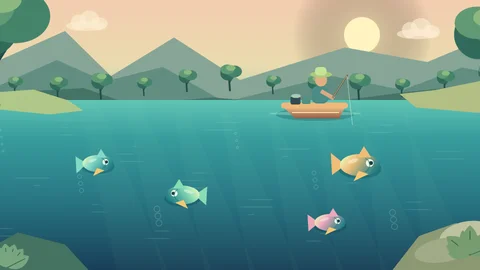
Tidebend
Easy-going · 60 sec
Lane & Roll
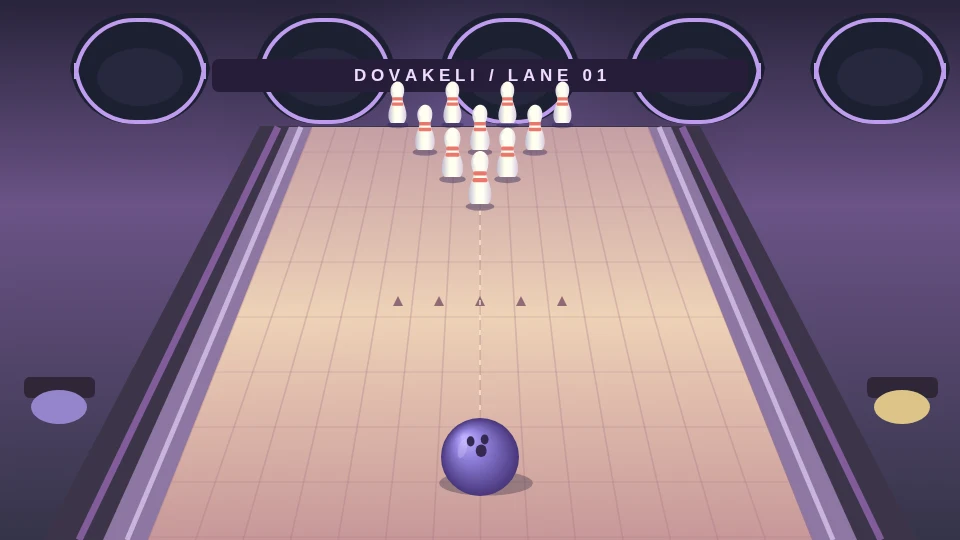
Aiming · 5 frames
Editorial picks, not a live player ranking.
A SEPARATE PART OF THE CATALOGUE
Browse the conceptsNine ideas, still in development.
Illustrated concepts are available to read about. They have no playable version or confirmed release date. The three games above are ready now.
WHAT YOU CAN PLAY HERE
Pick the kind of challenge you enjoy.
These are complete, playable mini-games. Each has its own controls, scoring and finish.
A patient minute with Tidebend
Move a small boat across the river and drop a line towards passing fish. Different colours are worth 10, 20 or 30 points. A hooked fish only counts once you bring it to the surface, so the last few seconds are about finishing a catch rather than starting a deep cast.
Choose this one if you enjoy watching a pattern and picking your moment. Try a short cast first to learn the hook’s travel time.
Tidebend controls and tipsA quick run with Glimmer Run
Steer a rover underneath falling gold coins and move away from stones. Every coin adds 10 points. You start with three shields; a stone removes one, and the round ends when the shields run out or the 45-second clock reaches zero.
Choose this one for a faster break. Look above the rover before chasing a coin, and leave yourself room to move away from a stone.
Glimmer Run controls and tipsFive shots with Lane & Roll
Set an angle and a power level, then roll towards a fresh rack of ten pins. You get five rolls, with one point per pin and a maximum of 50 points. This is a compact aiming game, not the ten-frame scoring system used in a full bowling match.
Choose this one if you prefer adjusting a shot to racing a timer. Compare the result of each roll and change one setting at a time.
Lane & Roll controls and tipsFROM FIRST CLICK TO FIRST ROUND
Open a game. Read the rule. Press Start.
Choose a playable title
The three games above open on their own pages. You can read the rules and see screenshots before you begin. Nothing downloads and no game starts automatically.
Use the controls that suit you
Use arrow keys and the on-screen buttons on a computer. On a phone, use touch controls. Pause a round whenever you need to; the games do not require sound.
Keep a score or share feedback
Your best scores and favourites stay in the current tab by default. Choose device storage to keep them between visits. Ratings and comments are optional and public.
ABOUT THIS WEBSITE
A small, independent browser arcade.
Dovakeli is a casual-games website at dovakeli.online. This collection centres on three short games you can play directly on the site: fishing, collecting and bowling. There is no account system, paid membership or checkout.
Game points and coins are scores, with no cash value or prizes. The catalogue also contains nine clearly marked development concepts. Those pages explain ideas and show artwork; they are not playable releases and have no announced release date.
Read about DovakeliBEFORE YOU PLAY
A few useful answers.
Are all twelve catalogue entries games I can play?
Three are playable now: Tidebend, Glimmer Run and Lane & Roll. The other nine are concepts marked “In development”. Use the catalogue’s “Ready to play” filter to see only released games.
Will opening a game start a download?
No. A game link opens a normal page on this website. The game starts on that page when you press Start. JavaScript is needed for gameplay; the rules and other reading pages remain available without it.
Do I have to save progress or leave a rating?
No. Both are optional. You can play without enabling permanent device storage and without writing a comment. Clearing your saved progress does not remove a public review.
What if the game feels too small on my phone?
Try landscape orientation to give the play area more width. Use the on-screen controls and read the game’s guide for the touch gestures. If a control does not respond, pause and reload the page before starting a new round.